


SPONSORED What's This?
Best Antivirus for iPhone in 2024: 100% Protection From Threats
iPhones don’t need traditional antivirus programs thanks to their unique sandboxing feature, which prevents apps from causing substantial damage to the system. This makes the majority of antivirus available on the market that do simple virus scans redundant for iPhone users.
But, Apple’s iOS is still vulnerable to a plethora of other risks — everything from phishing attacks to insecure Wi-Fi networks and unsafe websites.
We tested the best antivirus on the App Store to find the top apps that can effectively protect your iPhone from all of the threats above. Read on to find out more about each of them and decide which is best for you.
1. Norton Mobile Security — Best Antivirus for iPhone in 2024
Norton Mobile Security is at the top of our list of the best antivirus apps for iPhone in 2024 because it has everything you need to keep your iPhone safe. These features include:
- Web protection — Protects against malicious and phishing links in browsers, apps, emails, and text messages.
- Wi-Fi scanner — Checks for threats and notifies you if you’re connected to an insecure Wi-Fi network.
- VPN (virtual private network) — Scrambles your internet traffic to make it unreadable and hides your IP address (and your location).
- Dark web monitoring — Scans the dark web for your email address and other personal information and notifies you if any of your data has leaked or stolen.
- Device security — Lets you know if your iPhone’s iOS is out of date and needs to be updated.
- Scam SMS message filtering — Blocks unsafe SMS text messages.
We tested all of these features on iOS and they worked really well. Norton caught a couple of phishing sites we tried to visit in our tests, flagged all insecure public Wi-Fi networks, and it’s impressive how its dark web monitoring scans for every personally identifiable information you may have online.
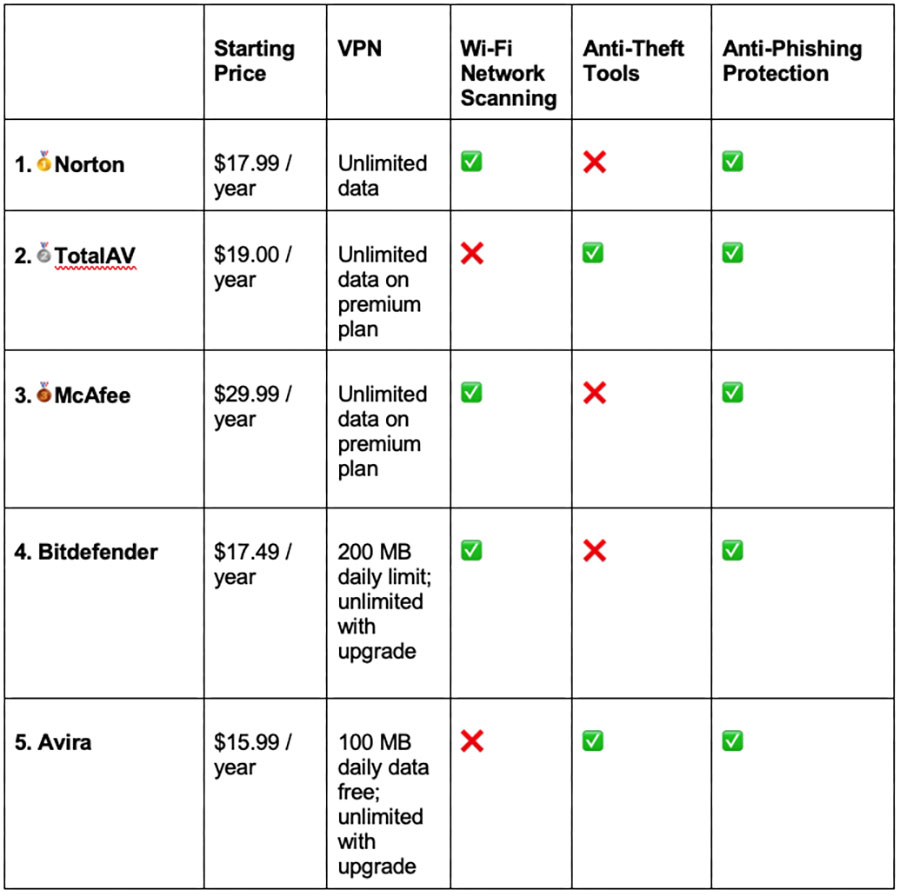
Norton Mobile Security costs $17.99. It covers 1 device and is backed by a generous 60-day money-back guarantee.
2. TotalAV Mobile Security — Excellent Pick for Beginners
TotalAV Mobile Security is an easy-to-use app that’s great for iPhone users that have never used antivirus software before. Plus, it has excellent anti-theft tools and does a great job at protecting from web-based threats.
TotalAV offers a couple of useful extras for iPhone users, such as:
- Anti-phishing.
- Data breach monitoring.
- VPN (with unlimited data).
- Device tracking.
- Photo clean-up.
- Device optimization tools.
During our tests, TotalAV's anti-phishing protection performed really well, detecting almost all phishing sites. Its antivirus-bundled VPN is one of the best — it’s very fast, comes with all the VPN industry-standard features, and has really good streaming support, allowing you to safely watch your favorite shows online.
TotalAV Mobile Security is included in several TotalAV's antivirus packages, starting at $19.00. I highly recommend TotalAV Internet Security which costs $39.00 — it covers up to 6 devices (including PC, Mac, and Android) and has a 30-day money-back guarantee.
3. McAfee Mobile Security — Good Web Protection for iPhones
McAfee Mobile Security provides an excellent toolset for iPhone users, including some of the best web protections available, such as:
- Anti-phishing protection.
- Identity monitoring.
- VPN (with unlimited data).
- Wi-Fi scanner.
- System scan (checks for new updates).
McAfee’s anti-phishing tool did a great job in our tests — it detected and blocked every suspicious website we tried. Its Wi-Fi scanner flagged all public Wi-Fi that our iOS detected and its system scan found every security issue on the iOS we tested, including outdated iOS software and important protections that were turned off (like the anti-phishing tool). Plus, its VPN comes with all the industry-standard security features and works with top streaming sites.
McAfee Mobile Security protects a single iPhone device for $29.99 / year. If you want to protect multiple devices, I recommend McAfee’s Total Protection plans (starting at $39.99). All plans are backed by a 30-day money-back guarantee.
4. Bitdefender Mobile Security — Great Scam Protection for iPhones
Bitdefender Mobile Security comes with a top-notch scam protection feature for iPhone. In our tests, it automatically moved all potentially dangerous SMS & MMS messages to the junk folder and flagged all suspicious links we tried.
It also comes with a good range of other iOS-friendly features, including:
- Web protection.
- Data breach monitoring (email only).
- VPN (with a daily limit of 200 MB).
- Smartwatch compatibility.
When we tested it, Bitdefender reminded us to upgrade to the latest iOS version, checked Wi-Fi security, and the vulnerability scanner highlighted all websites that required a password change. The VPN that comes bundled is very secure and makes it easy to automate secure connections.
Bitdefender Mobile Security provides protection for a single mobile device for $17.49. To protect more devices and other OS, check out Bitdefender Total Security, which costs $49.99. All plans are backed by a 30-day money-back guarantee.
5. Avira Mobile Security — Great Free Antivirus for iPhone
Avira Mobile Security comes with great features that protect your privacy on iOS free of charge. These include:
- Anti-theft.
- VPN (100 MB daily limit for free users).
- Photo clean-up.
- Call blocker.
Our favorite is Avira’s unique Privacy Manager that prevents Siri from sharing your data with Apple. In our tests, its anti-theft protections allowed us to wipe all data, lock the iOS, and track the phones we tested. Its VPN is good, too — it’s secure and has decent speeds.
- Breach monitor(paid plan).
- Anti-phishing (paid plan).
Avira’s Mobile Security plan only protects 1 iOS device. If you want the unlimited VPN, data breach monitoring, and anti-phishing protection, consider Avira Mobile Security Pro that starts at $15.99. To protect multiple devices, I recommend Avira Prime, starting at $36.99. Avira’s paid plans all come with a 60-day money-back guarantee.
Comparison of the Best Antivirus Apps for iPhone in 2024
How We Chose the Best Antivirus for iPhone in 2024
- Look for strong web security. A good iOS antivirus app protects from online threats like suspicious websites, scam messages, and phishing links. The apps we recommend check all of these boxes.
- Get an antivirus with strong privacy features. A good iPhone antivirus comes with useful privacy features such as VPNs, app permission monitoring, and features that prevent Apple from storing Siri queries.
- Look for an antivirus with a user-friendly app. All of the antiviruses on the list are compatible with iOS, are very easy to navigate, and have a minimal impact on battery life.
- Choose an antivirus that offers excellent value. Good security shouldn’t cost a fortune. We've compared what you get from each antivirus with its price and the ones we recommend provide maximum protection for what you pay.
What Is an iPhone Antivirus?
On iPhones, the concept of an antivirus app differs significantly from what you might expect on a PC or Android device. Due to iOS's sandboxing architecture, where each app operates in a self-contained environment, the risk of viruses spreading across the system is greatly reduced. This means traditional antivirus functions, like scanning and removing malware, aren't necessary on iPhones.
However, what we commonly refer to as 'antivirus apps' for iOS are essentially comprehensive security tools. They don't just look for viruses — they provide a range of features to enhance your overall digital security. These include VPNs for secure internet browsing, data breach monitoring, anti-phishing tools, and optimization options to keep your iOS up to date.
Why Use an iPhone Antivirus
Although Apple’s iOS is relatively secure, it’s not immune to all digital threats. Apple doesn’t protect you from:
- All forms of phishing. Antivirus apps help detect and prevent phishing attempts through email, websites, and messages, protecting your data.
- Scam SMS and iMessage messages. These apps can detect and block potential scams and malware links sent via text message.
- Secure online browsing. Antiviruses offer web protection features that alert you to malicious websites.
- Wi-Fi network security. Antivirus apps for iOS devices scan Wi-Fi networks for vulnerabilities and alert you about unsecured networks, which are common sources of cyber threats. A lot of good iOS antivirus apps come with a VPN that protect you from these kinds of threats.
- Data breach monitoring. Many antivirus apps offer dark web monitoring and data breach alerts, letting you know if your personal information has been compromised in a data breach.
How to Set Up & Use an iPhone Antivirus
- Download & install the antivirus app on your iPhone. Launch the App Store on your device and look for the antivirus app via the search function. Then, tap on it and download it on your iPhone. Note that you may need to use your Face ID or password to download, depending on how your iPhone is set up.
- Set up the app. Launch the app and follow the on-screen instructions. The app will guide you through all the important steps, including creating an account and selecting a plan.
- Start using the antivirus. The antivirus app will recommend steps to make your iPhone more secure. You can also manually take advantage of all of its features — just make sure you give it permission to work.
Bottom Line
Apple's iOS is known for its robust security, primarily due to its effective "sandboxing" approach that isolates apps, reducing system-wide vulnerabilities. However, even with this level of security, you’re not exactly safe from all threats, such as phishing attacks, data breaches, and device theft.
The antivirus solutions we recommend go beyond basic protection. They encompass a variety of features such as web protection, VPN services for secure browsing, Wi-Fi scanners to detect network threats, and dark web monitoring.
For 2024, our top pick for iPhone antivirus is Norton. It’s easy-to-use and includes all the protection you need for your iOS. Plus, it doesn’t slow down your device’s performance, and you get a 60-day money-back guarantee, so you can test the service risk-free.
